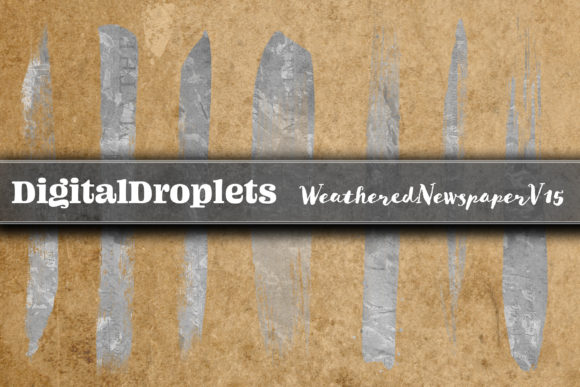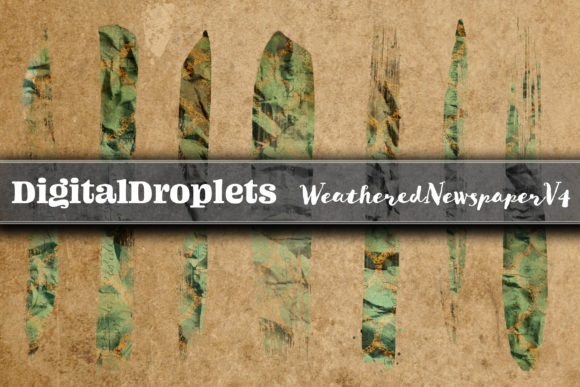
WeatheredNewspaper V4 Brush Strokes
In the landscape of digital design, the transition from a blank canvas to a finished product often requires more than just technical skill; it demands texture, history, and a sense of tactile reality. This is where WeatheredNewspaper V4 Brush Strokes becomes an indispensable asset for professionals and creators alike. Rather than viewing these assets merely as decorative elements, they should be understood as functional components within a broader design workflow. The collection offers 400 uniquely patterned brush strokes derived directly from the Weathered Newspaper Vol. 4 paper set, providing a bridge between raw digital files and organic, vintage aesthetics.
The core value of this collection lies in its sheer volume and variety. By combining 20 distinct brush stroke shapes with 20 unique paper patterns, the result is a comprehensive library of 400 individual designs. Each element maintains high fidelity at 300dpi, ensuring that whether you are printing a business card or designing a large-format poster, the output remains crisp and professional. The dimensions, reaching up to 10.3 inches by 2 inches depending on the specific shape, offer sufficient scale to act as headers, dividers, or background textures without overwhelming the composition.
Integrating Texture into Digital Workflows
For project managers and creative directors, the introduction of new assets can sometimes disrupt established processes. However, WeatheredNewspaper V4 Brush Strokes is designed to slot seamlessly into existing pipelines. Because every file is provided in PNG format with a transparent background, integration is immediate. There is no need for complex masking or background removal steps. You can drag and drop these elements directly into your preferred software environment, whether that is Adobe Photoshop, Canva, Procreate, or Affinity Designer.
This transparency feature is particularly critical for efficiency. In a fast-paced agency environment, time is currency. The ability to layer these brush strokes over photographs or solid colors allows designers to manipulate opacity instantly. By reducing the transparency of a weathered newspaper stroke, you can create a subtle, blended effect that integrates the texture into the underlying image rather than sitting atop it. This technique mimics the look of ink soaking into aged paper, adding depth without requiring advanced compositing skills.
Pre-Production Planning and Asset Organization
Successful implementation begins before the actual design work starts. When approaching a new project, such as a client's brand refresh or a personal scrapbook layout, the first step is selecting the appropriate aesthetic direction. If the goal is to evoke nostalgia, authenticity, or a DIY aesthetic, the WeatheredNewspaper collection provides the necessary visual language immediately. Before opening your design software, organize your workflow by categorizing the 400 available strokes based on their intended use.
Consider creating a "texture bank" within your project folder. Group the brush strokes by intensity or pattern type. For instance, if you are working on a series of blog graphics, you might separate the lighter, more subtle strokes from the darker, high-contrast ones. This pre-production organization reduces decision fatigue during the execution phase. Instead of scrolling through hundreds of files while under a deadline, you have a curated selection ready for immediate deployment. This level of preparation ensures consistency across all deliverables, a key metric for quality control in professional publishing.
Application Across Diverse Use Cases
The versatility of these brush strokes extends far beyond simple decoration. They serve as structural elements in various design contexts. For small business owners and entrepreneurs, these assets can elevate the perceived value of marketing materials. Imagine a digital invitation for a wedding or a corporate event; applying a weathered newspaper border can add a touch of elegance and exclusivity that standard fonts cannot achieve.
- Scrapbooking and Junk Journals: For hobbyists and content creators documenting personal histories, these strokes act as authentic framing devices. They simulate the look of torn paper edges or vintage clippings, allowing users to build layered narratives without physical crafting.
- Digital Photo Albums: When compiling memories, the texture adds a sense of timelessness. Placing a brush stroke behind a photograph creates a focal point, drawing the viewer's eye to the central subject while grounding the image in a rustic context.
- Business Cards and Stationery: In a crowded marketplace, tactile visuals stand out. Using these strokes on business cards for creative agencies, publishers, or educators can signal a hands-on approach and attention to detail.
- Planner Stickers and Productivity Tools: For productivity-minded users, these assets can be used to create custom planner stickers. The varied shapes allow for the creation of checklists, date headers, and section dividers that make digital planning feel more engaging and less sterile.
Post-Processing and Final Polish
While many designers apply textures at the beginning of a project, there is significant utility in using WeatheredNewspaper V4 Brush Strokes during the final review stage. After the primary layout is complete, adding a subtle overlay of these brush strokes can unify disparate elements. If a design feels too clean or digital, a strategically placed, low-opacity newspaper stroke can introduce the necessary imperfection that makes the piece feel human and relatable.
This post-processing step is essential for maintaining quality control. It acts as a filter that ties together different color palettes and font choices. For example, if a collage contains images from different eras or sources, the consistent application of the weathered texture can create a cohesive visual story. The 300dpi resolution ensures that even when applied as a final overlay, the image retains its sharpness, preventing any loss of quality that might occur with lower-resolution alternatives.
Collaboration and Resource Management
In collaborative environments, such as teams working on a shared calendar or a multi-author blog, having a standardized set of assets is crucial. Distributing the WeatheredNewspaper V4 collection to all team members ensures that everyone is working from the same visual vocabulary. This prevents the common issue of inconsistent styling, where one designer uses a rough texture and another uses a smooth gradient, resulting in a disjointed final product.
The inclusion of 400 high-resolution files means that the resource is future-proof. As projects evolve or new campaigns launch, the team will not run out of options. The ability to modify transparency also facilitates collaboration. A junior designer might apply a stroke at full opacity, while a senior editor might suggest lowering it to 60% to better suit the overall tone. This flexibility encourages iteration and refinement without the need to source new assets constantly.
Long-Term Utility and Scalability
One of the most practical considerations for any digital purchase is long-term value. The WeatheredNewspaper V4 collection is not limited to a single project type. Its scalability allows it to grow with your needs. Whether you are producing a single flyer today or a year-long series of educational materials, the 400 unique shapes provide endless combinations. The fact that the strokes are derived from a specific paper set ensures that they share a common DNA, making them inherently compatible with each other.
Furthermore, the file format (PNG) guarantees compatibility across almost all modern platforms. You can use these assets in web design, print production, mobile app interfaces, or social media graphics without conversion issues. This cross-platform capability simplifies the workflow, removing the technical barriers that often slow down creative execution. By investing in a robust, high-quality set like this, creators and businesses can focus their energy on strategy and storytelling rather than troubleshooting file formats or searching for suitable textures.