Digital Planner Covers: Customize Your Note-Taking Experience
There is a distinct satisfaction in opening a beautifully designed notebook, feeling the texture of the cover, and seeing a title that speaks directly to your current goals. Yet, for many professionals and creators who have migrated their lives to digital platforms like GoodNotes, Notability, or OneNote, that tactile joy often feels lost. Digital Planner Covers bridge this gap perfectly. They transform sterile PDF files into personalized workspaces that look and feel as unique as your own handwriting.
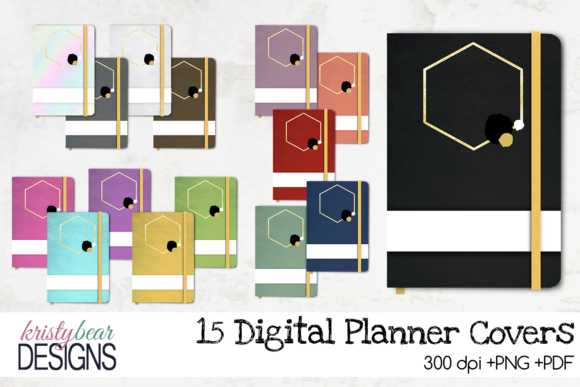
These assets are not merely decorative skins; they are functional tools designed to elevate your digital organization. By offering high-quality PDFs for seamless importing and a vast selection of 15 vibrant PNG designs, they allow you to curate a library of notebooks that reflect your brand, your mood, or your specific project needs. Whether you are a marketer launching a campaign, an educator planning a semester, or a freelancer managing multiple client accounts, customizing your interface can significantly impact your workflow and mental clarity.
Why Customization Matters in Digital Productivity
In the realm of digital note-taking, visual cues play a massive role in how our brains categorize information. When you open an app with dozens of unlabelled or generic grey covers, it creates cognitive friction. You have to pause to remember which file holds your Q3 budget versus your personal travel itinerary. Digital Planner Covers solve this problem by introducing immediate visual differentiation.
The ability to add your own text over the notebook cover turns a standard template into a bespoke tool. Imagine having a cover that reads "Content Strategy 2024" in bold typography against a sleek background, or one that says "Wedding Planning" in elegant script. This level of customization does more than just look good; it reduces the time spent searching for files and increases the likelihood that you will actually use the planner. It signals to your brain that this is a dedicated space for important work, fostering a sense of ownership and commitment to the tasks at hand.
The Technical Advantage: PDF and PNG Integration
One of the primary strengths of these digital assets lies in their technical versatility. The inclusion of PDF files ensures super easy importing across all major note-taking applications. Most users know the struggle of trying to force a low-resolution image into a planner so it doesn't distort when you zoom in. These pre-formatted PDFs are optimized for high resolution, ensuring that every line, grid, and design element remains crisp regardless of the device you are using.
Simultaneously, the availability of 15 different colors in PNG format offers flexibility for those who want to mix and match or apply the covers to existing templates. PNGs support transparency, meaning you can layer them over different backgrounds without unsightly white boxes appearing around the edges. This dual-format approach caters to both the user who wants a plug-and-play solution and the creative who wants to tinker with their design before finalizing it.
Real-World Applications Across Industries
The utility of customizable digital planner covers extends far beyond simple daily scheduling. Different professions require different visual languages, and these covers provide the canvas to express that identity effectively.
- Entrepreneurs and Business Owners: For small business owners juggling operations, finance, and marketing, a set of color-coded covers can serve as a visual dashboard. You might assign a specific cover color to "Inventory," another to "Employee Schedules," and a third to "Financial Reports." Adding your company logo or name directly onto the cover reinforces your brand identity within your own workspace, keeping you aligned with your business vision every time you unlock your tablet.
- Educators and Students: Teachers can create themed planners for each subject or grade level. A "Science Lab Notes" cover with a scientific motif helps students mentally switch gears between subjects. Similarly, university students can organize their semesters by course, making exam preparation more streamlined and less overwhelming.
- Creatives and Bloggers: Content creators often manage complex editorial calendars. Using Digital Planner Covers allows them to visualize their content pipeline. A blogger could have a specific cover for "Instagram Ideas," another for "Blog Drafts," and a third for "Analytics Review." The ability to customize the text means they can update these titles as campaigns shift, keeping the planner relevant and dynamic.
- Freelancers and Consultants: Since freelancers often work on multiple projects simultaneously, distinguishing between clients is crucial. A consultant working with five different clients can create a unique cover for each, complete with the client's name. This prevents cross-contamination of notes and ensures that sensitive information remains organized and easily accessible.
Enhancing User Experience and Branding
Beyond mere organization, there is a psychological benefit to using aesthetically pleasing tools. When your digital environment is visually appealing, engagement levels rise. You are more likely to sit down and write if the interface invites you rather than intimidates you. This is particularly true for hobbyists who use digital planners for journaling, fitness tracking, or meal planning. The 15 available color options ensure that there is a palette to match any personal style, from minimalist neutrals to bold, energetic hues.
For publishers and marketers, this customization capability extends to commercial potential. Instead of selling a generic planner, a creator can sell a bundle where the buyer receives the core planner but has the option to purchase exclusive cover packs that align with specific niches, such as "Yoga Instructor Planner" or "Small Business Finance Tracker." This adds value to the product and creates a deeper connection with the end-user.
Practical Considerations for Implementation
While the benefits are clear, successfully integrating Digital Planner Covers requires a bit of strategic thinking. First, consider your workflow. If you import new planners weekly, ensure your file naming conventions match the cover titles you choose. If you plan to use the same cover for years, focus on timeless designs and neutral colors that won't date quickly.
Secondly, think about the text overlay. While adding your own text is a powerful feature, avoid clutter. Use concise, legible fonts that stand out against the background. The goal is instant recognition, not a puzzle to solve. If you are using these for professional branding, ensure your font choices and color schemes align with your overall corporate identity guidelines.
Finally, evaluate the quality of the source files. High-resolution assets are non-negotiable. Blurry covers can detract from the premium feel of your note-taking app. The combination of easy-to-import PDFs and versatile PNGs provided in these packs eliminates the need for graphic design skills, allowing anyone to achieve a polished look with minimal effort. Whether you are organizing a wedding, running a startup, or simply trying to get your life together, the right digital cover can be the catalyst that turns a chaotic collection of notes into a cohesive, productive system.
By taking control of your digital aesthetic, you take control of your productivity. The transition from a generic digital folder to a customized, branded, and visually engaging notebook is a small change that yields significant returns in efficiency and satisfaction. With Digital Planner Covers, your digital workspace becomes an extension of your personal brand and professional capabilities, ready to handle whatever challenges come your way.