Circle Flower Design for 12x12 Artboards
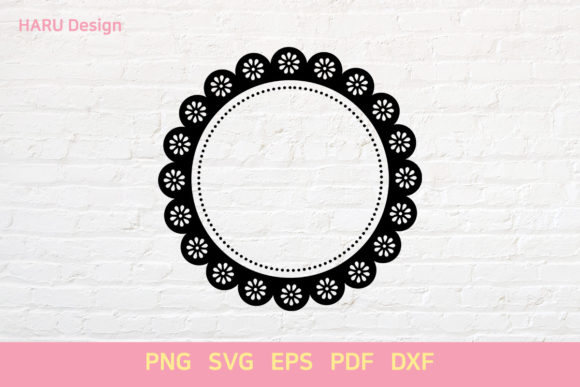
In the fast-paced world of digital creation and physical production, finding a design asset that balances aesthetic appeal with technical versatility is often a challenge. The Circle Flower concept addresses this need by offering a versatile geometric pattern centered around floral motifs. This specific design package includes one SVG file, one EPS file, one PNG file, one PDF file, and one DXF file, all optimized for a standard 12-inch by 12-inch artboard. This precise dimension is not arbitrary; it aligns perfectly with the most common cutting mats used in crafting, scrapbooking, and small-scale manufacturing.
For professionals and hobbyists alike, having a single asset that translates seamlessly from a vector-based workflow to a raster-ready image or a direct-cutting path is invaluable. The Circle Flower design serves as a foundational element that can be adapted for various projects without requiring extensive reworking. Whether you are a graphic designer preparing assets for a client presentation or a small business owner creating custom merchandise, this multi-format collection provides the flexibility needed to execute ideas efficiently.
Why the 12-Inch by 12-Inch Standard Matters
The specification of a 12-inch by 12-inch artboard is a critical detail that separates generic clip art from professional-grade tools. This size is the industry standard for square paper cuts, scrapbook layouts, and vinyl decal applications. When you download the Circle Flower files, you are receiving a composition that fits these dimensions exactly, eliminating the need to guess margins or resize elements manually.
For creators using software like Adobe Illustrator or CorelDRAW, starting with the correct artboard size ensures that your final output maintains the intended proportions. If you are working on a project that requires a circular motif to fill a square space, such as a coaster design or a wall decal, the pre-set dimensions save significant time. You can place the design directly onto your canvas and proceed with customization, knowing that the geometry will hold up under scaling or rotation.
This standardization also benefits those who work with physical cutting machines like Cricut or Silhouette. These devices often rely on grid systems where a 12x12 inch area represents a full mat load. By providing the Circle Flower in formats compatible with this size, the package reduces the risk of alignment errors during the cutting process. It allows users to maximize their material usage, ensuring that no part of the expensive vinyl or cardstock goes to waste due to poor layout planning.
Understanding the Value of Multi-Format Support
One of the most practical aspects of this design package is the inclusion of five distinct file types: SVG, EPS, PNG, PDF, and DXF. Each format serves a unique purpose in the creative workflow, and having them all available in one bundle means you are prepared for any scenario. You do not need to search for alternative versions or convert files using third-party tools, which can sometimes degrade quality or alter paths.
- SVG (Scalable Vector Graphics): This is the go-to format for web designers and modern cutting machines. Because it is vector-based, the Circle Flower remains crisp at any size. If you need to scale the flower up for a billboard or down for a social media icon, the lines remain sharp. This is essential for maintaining brand consistency across different media.
- EPS (Encapsulated PostScript): A legacy but robust format widely supported by professional print shops and desktop publishing software. If you are sending the Circle Flower design to a commercial printer, the EPS file ensures that the colors and vector paths are interpreted correctly, preserving the integrity of the artwork.
- PNG (Portable Network Graphics): For quick previews, presentations, or social media posts where transparency is required, the PNG file offers an immediate solution. It renders the design as a high-resolution image that can be dropped into email newsletters or website headers without worrying about vector compatibility issues.
- PDF (Portable Document Format): This format is ideal for sharing proofs with clients or printing documents that require a consistent look across different operating systems. The PDF version of the Circle Flower allows stakeholders to view the design accurately before production begins.
- DXF (Drawing Exchange Format): Crucial for CNC machining and laser cutting workflows. The DXF file converts the visual design into precise coordinate data that industrial machinery can read. This makes the Circle Flower suitable for etching patterns onto metal, wood, or acrylic sheets.
Practical Applications Across Industries
The utility of the Circle Flower extends beyond simple decoration. Its geometric nature allows it to function as a structural element in design. Marketers might use the SVG version to create branded stamps or watermarks for digital documents, adding a touch of elegance to reports or contracts. The clean lines of the 12x12 composition ensure that these marks do not overpower the text they accompany.
Educators and content creators can leverage the PNG and PDF files to produce engaging learning materials. Imagine designing a worksheet where students must identify shapes within the Circle Flower pattern, or using the EPS file to create a large poster for a classroom display. The ability to manipulate the design easily allows teachers to tailor the complexity of the activity to the age group they are serving.
Entrepreneurs selling handmade goods benefit significantly from the DXF and SVG files. A small business owner producing custom tote bags or mugs can import the Circle Flower design directly into their production software. Because the artboard is set to 12 inches, they can easily arrange multiple instances of the flower on a larger sheet of material to optimize cutting efficiency. This optimization translates directly to cost savings and higher profit margins.
Enhancing Communication Through Visual Clarity
Effective communication often relies on clear, unambiguous visuals. In presentations, a cluttered slide can distract from the message. The Circle Flower, with its balanced symmetry and defined boundaries, offers a focal point that draws attention without causing visual fatigue. When used as a background element or a bullet point style, it adds a layer of sophistication to business decks.
Furthermore, the availability of the PDF format supports better collaboration. Teams can share the design document without needing specialized software installed on every machine. This accessibility streamlines the review process, allowing feedback to be incorporated quickly. When everyone is looking at the same high-fidelity representation of the Circle Flower, misunderstandings regarding color, size, or layout are minimized.
Considerations for Successful Implementation
While the Circle Flower package offers extensive capabilities, it is important to approach its use with a clear understanding of its limitations. The 12-inch by 12-inch artboard is a fixed canvas. While vector formats allow for scaling, extreme enlargement may reveal pixelation if the source resolution is low, though the SVG and EPS files mitigate this risk. Users should always verify the final output size against their specific project requirements before committing to a full production run.
Additionally, the complexity of the cut paths in the DXF and SVG files depends on the intricacy of the original design. Very fine details in the floral pattern might be challenging for lower-end cutting machines to handle. It is advisable to test a small section of the design on scrap material first. This practice helps identify potential issues with blade pressure or speed settings, ensuring that the final product matches the digital preview.
Color management is another factor to consider. The RGB values used in the PNG and SVG files may differ slightly from the CMYK values required for professional printing. While the EPS and PDF files generally preserve color profiles well, users should always proof the Circle Flower design on the intended substrate before mass production. This step prevents unexpected shifts in hue that could affect the overall aesthetic of the project.
Selecting the Right Tool for the Job
Choosing the correct file type is just as important as choosing the right design. If your goal is to create a website banner, the SVG is the superior choice due to its lightweight nature and scalability. However, if you are preparing a brochure for a local printer, the PDF or EPS files will yield better results. The key is to match the file format to the end-use environment.
For those new to vector editing, the provided documentation and the simplicity of the Circle Flower shape make it an excellent learning tool. Beginners can experiment with changing stroke widths, filling areas with gradients, or combining the flower with other shapes to build more complex compositions. The 12x12 constraint provides a helpful boundary, encouraging focus on the details rather than getting lost in infinite canvas possibilities.
Ultimately, the value of the Circle Flower lies in its adaptability. It is not merely a static image but a dynamic resource that supports a wide range of goals. From simplifying the decision-making process for designers to enabling small businesses to launch products faster, this multi-format collection bridges the gap between concept and execution. By integrating these files into your workflow, you gain a reliable asset that enhances creativity while respecting the practical constraints of modern production.